Your Mac has a setting called “Wake for network access” that can have significant implications. This setting allows your Mac to wake from Sleep mode to provide shared resources. While it can be useful for sharing files and other resources on your network, there are reasons to consider turning it off.
Wake for network access keeps your network card partially powered to respond to requests for file sharing, screen sharing, music playlists, and more. If you don’t frequently use these features, disabling this setting can save battery life and enhance security.
For MacBook users, leaving “Wake for network access” enabled can result in unnecessary battery drain, especially on older models. Disabling this setting can help preserve battery life, particularly overnight.
From a security standpoint, having “Wake for network access” enabled can make your Mac more vulnerable on public Wi-Fi networks. Disabling it can mitigate potential risks from unauthorized access.
While “Wake for network access” is more critical for MacBook users, desktop Mac users can also benefit from reviewing and adjusting this setting. Turning it off can enhance privacy and security.
On a MacBook
- Open the System Settings app.
- Select Battery.
- Click Options at the bottom.
- Select Never from the pop-up menu next to “Wake for network access.”
- Click Done.
On a Mac
Mac desktops have a similar setting in the “Energy” section, where you can toggle off “Wake for network access” to conserve power and improve security.
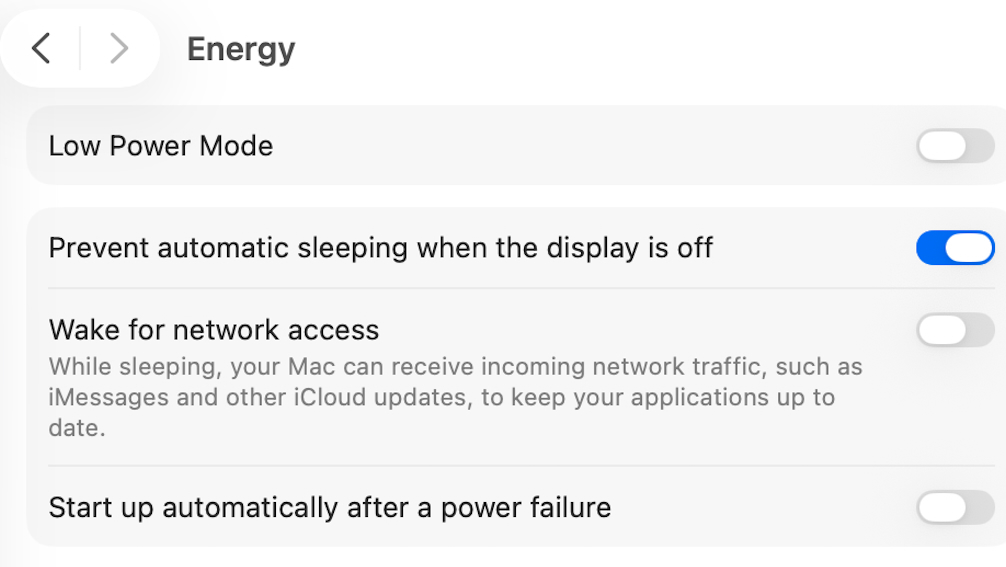
- Open the System Settings app.
- Select Energy.
- Toggle off Wake for network access.
Will Find My Still Work?

Disabling “Wake for network access” may not affect Find My functionality on newer Macs, but older models may require this setting to report their location when asleep. Reviewing and adjusting this setting can optimize battery life and enhance security.
Take a moment to assess the “Wake for network access” setting on your Mac or MacBook. By disabling it when not needed, you can improve battery performance and reduce potential security risks, especially on public networks.
