Imagine this scenario: It’s the night before a crucial day. You plan to wake up early to avoid rushing, so you set your alarm or adjust your iPhone’s sleep schedule.
You go to bed, and upon waking up the next morning, you feel refreshed. Perhaps too refreshed. You check your iPhone only to discover that you overslept, and the alarm didn’t make a sound. Now you’re running late and blaming your iPhone as you hastily get ready.
Regrettably, this situation occurs more frequently than you might think, and it’s not entirely your fault. However, there are some adjustments you can make to rectify this issue. Let’s delve into them.
First, Ensure Your Alarm Volume Is Maximized
While this isn’t usually an issue with regular alarms, it’s essential to note that a sleep schedule alarm has its own independent volume setting, which may sometimes be set lower than desired. Fortunately, adjusting this is a quick and simple process:
- Open the Clock app.
- Tap on the Alarms tab at the bottom of your screen.
- Tap on Change next to your Sleep Schedule alarm.
- Scroll down and under Sounds & Haptics, slide the volume all the way to the right or maximum.
Test your alarm to see if this resolves the issue. If not, let’s proceed to the next troubleshooting step.
Adjust the Default Haptics for Your Alarms
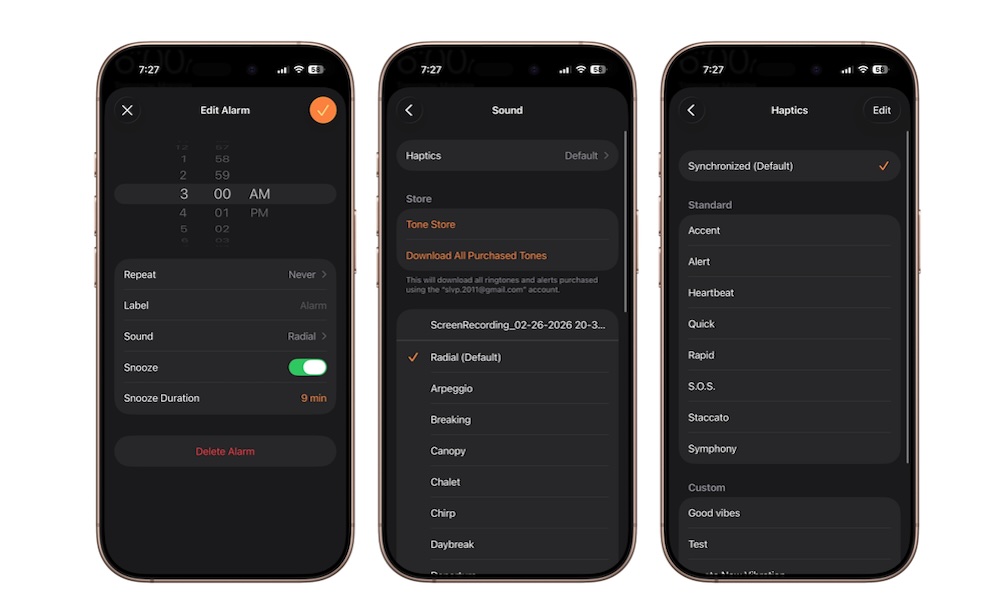
Many individuals have encountered this issue and found that altering this seemingly unrelated setting can be effective. Using the default haptics on your alarm might cause it to remain silent after activation. Changing this setting could potentially resolve the problem, so it’s worth trying. Here’s how:
- Open the Clock app.
- Tap on the Alarms tab at the bottom.
- Scroll down and select your alarm or navigate to your sleep schedule’s alarm.
- Tap on Sound (for regular alarms) or Sounds & Haptics (for sleep schedule alarms).
- Access Haptics.
The default haptic option for regular alarms is Synchronized. Feel free to choose an alternative. The sleep schedule alarm doesn’t feature default haptics, so this shouldn’t pose an issue. However, you can still customize it to your preference.
Say Goodbye to Oversleeping
Oversleeping is often self-inflicted. We tend to ignore alarms, request just a few more minutes, and regret it later. But when the blame falls on your iPhone, forgiveness is no longer an option. Thoughts of switching to an Android may even cross your mind.
The positive news is that tweaking these settings could prevent future occurrences of silent alarms. In case all else fails, having a backup alarm ready is always a good idea to ensure at least one alarm sounds.
